
The Billing Panel: How Reseller Subscription Management Works
The Billing Panel is your subscription management hub. It’s separate from where you manage domains and mailboxes, but it’s where your reseller account actually lives: your plan resources, your payment methods, your invoices, and the links to every other panel you use.
Here’s how it works and what to check before every renewal.
Your plan, at a glance
The Billing Panel’s plan page shows two things side by side: what your subscription includes, and what you’ve actually used.
- Resources included in your plan — the number of Basic, Enhanced, and OEX mailboxes your subscription covers, plus your total quota.
- Resources used — the number of each mailbox type you’ve actually created, plus the quota you’ve actually allocated.
Below that is a Stats by Domain report: a breakdown of active mailbox counts and quota usage per domain, across every Admin Panel account under your subscription. It’s exportable to CSV, so it’s an easy way to see exactly where your resources are going without logging into each Admin Panel separately.
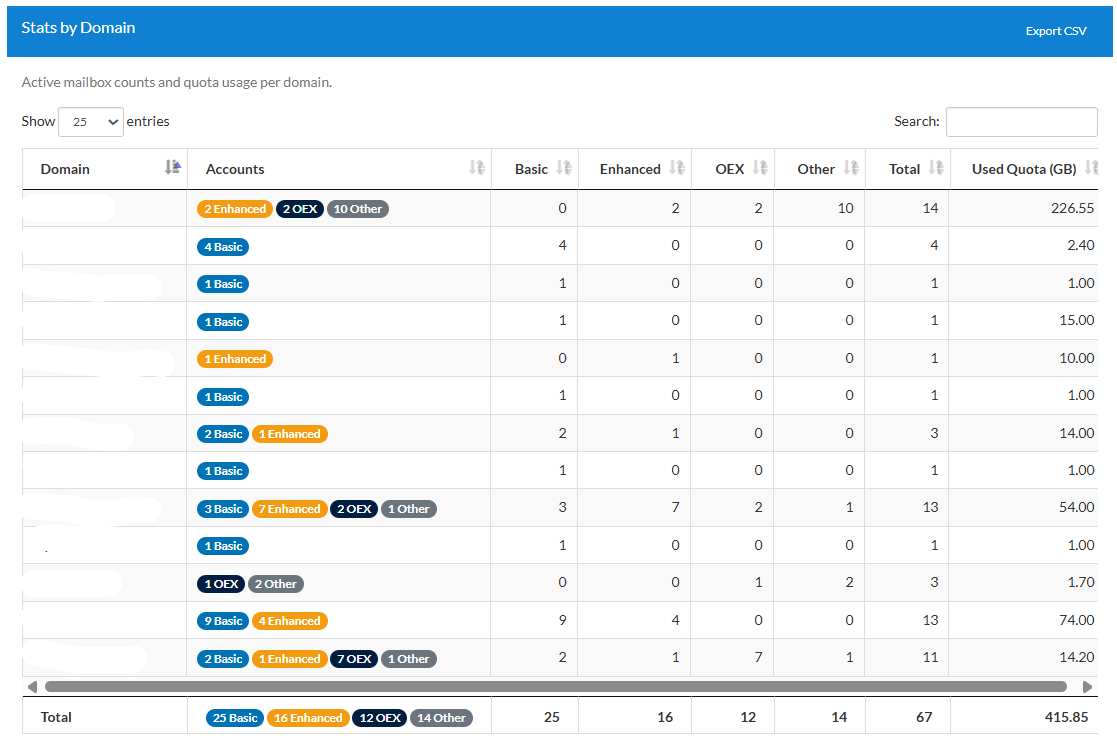
This same page also gives you a compact comparison that’s worth checking before every renewal:

Quick links to every panel you use
The Billing Panel is also your hub for reaching everything else. You’ll find links to:
If enabled on your accountSuper Panel
Email & personal settingsWebmail
Mailbox-level settingsUser Panel
Guides & documentationWiki
Tickets & helpSupport Portal
Super Panel only appears here if you’ve requested and been granted that access — it isn’t part of every reseller’s default setup.
Billing details and payment methods
From the Billing Panel you can update the card on file, check your available balance, and add your company details for invoicing. If you need extra information displayed on your invoices beyond what’s captured there, email us at [email protected] and we’ll add it.
Topping up your balance
You can add manual top-ups to your account at any time, with a $100 minimum. Top-up credits load your balance and get used against future invoices — they can’t be applied to an invoice that’s already been generated.
If your monthly reseller subscription is under $20/month, we also apply automatic top-ups of $20 whenever your balance is insufficient to cover your next invoice. These credits never expire, but like manual top-ups, they’re non-refundable.
How upgrades work
Upgrades happen automatically, once per week, based on your total created mailboxes and total allocated storage — so your account scales without you needing to watch it constantly. You can also trigger a manual upgrade yourself at any time.
Either way, upgrades are prorated. You only pay for the remaining time in your current subscription period, not a full new cycle.
How downgrades work
Downgrades are different: they’re not automatic. You need to manually downgrade your plan based on your actual usage, and downgrades are not refundable.
The easiest way to stay on top of this is the subscription renewal email we send 7 days before your renewal date. When you get it, log in to the Billing Panel, open the plan page, and compare your Plan Summary against your Active Mailboxes Summary. If you’re paying for more than you’re using, that’s your window to adjust before the next charge goes through.
Downgrades only take effect when you make them. If your usage has dropped, nothing adjusts your invoice automatically — check the renewal email and act on it.
Where your subscription resources actually go
Your subscription’s resources (mailbox counts and total quota) are passed to the highest-level panel on your account. For most resellers, that’s the Admin Panel by default.
If you’ve requested and been granted Super Panel access, resources go there instead. That means you’ll need to divide those resources between your individual Admin accounts yourself, so each one has the mailbox count and storage it needs to actually create mailboxes.
Billing cycle and cancellation
Subscriptions are monthly by default, and you can cancel at any time — but there are no refunds for unused subscription time, whether you cancel or simply reduce usage mid-cycle.
You can also choose to prepay yearly, or every 3 or 6 months, if that suits your accounting. That said, we generally recommend sticking with monthly prepayment: it keeps your billing in step with your actual usage and avoids locking in a resource level you might outgrow, or overpay for, before the prepayment period ends.
Questions about your specific plan, balance, or invoice setup? Reach out through the Support Portal or email [email protected] — we’re happy to walk through it with you.