
Your Inbox, Supercharged
with AI Assist
Cutting-edge AI integrated directly into your PolarisMail Webmail. Draft, summarize, translate, and search with full privacy control through your own API key.
Smarter Communication,
Seamless Integration
AI Assist works directly within your Webmail and Office document editor. No separate apps, no context switching.
Effortless Drafting
Generate professional emails from simple bullet points or a short description. Go from rough notes to polished message in seconds.
Instant Summaries
Distill long, complex email threads into clear, actionable summaries - in any language. Catch up after vacation in minutes, not hours.
Smart Replies
Context-aware response suggestions help you handle routine replies instantly. One click and you're done.
Real-time Translation
Break through language barriers by translating messages directly within your inbox. Communicate globally without leaving your workflow.
Natural Language Search
Find exactly what you need by searching your mailbox using everyday language. "Show me invoices from last month" just works.
Office Integration
AI Assist extends into the PolarisMail OfficeDocs document editor. Draft, edit, and refine documents with AI right where you work.
Bring Your Own Key
You own your tools and your data. AI Assist uses a BYOK model: connect your own API key from the provider you trust.
Ultimate Privacy Control
Maintain a direct relationship with your AI provider. Manage data sharing and memory retention policies to your own standards.
No "Training" on Your Data
Enterprise API endpoints don't use your data for model training. Verify and enforce these policies through your provider's dashboard.
Track costs on your terms
Since you use a dedicated API key, you can monitor exactly what your organization spends on AI Assist directly through your provider's billing dashboard. No bundled markups, no surprise fees, just the actual usage cost for your PolarisMail integration.
Auditability & Compliance
Access detailed usage logs and audit trails from your AI provider for simplified security audits and regulatory compliance.
Setup in Minutes
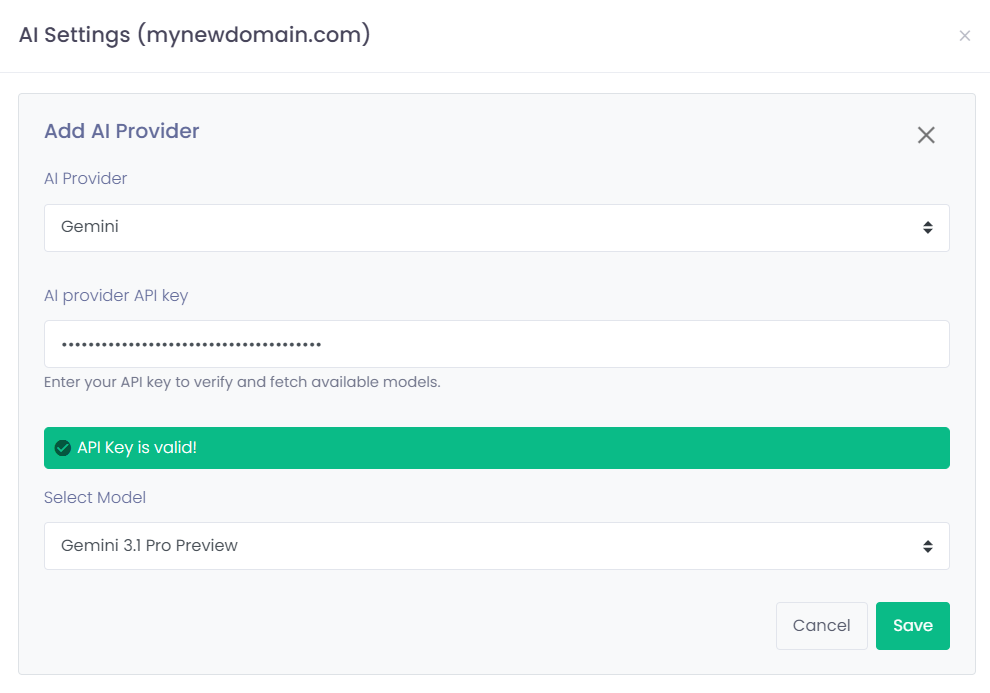
Administrators configure one API key at the domain level, then choose exactly which users get access.
Connect your AI provider: add your API key and choose your preferred model in the Admin Panel. One configuration covers your entire domain.
Enable users in a few clicks: grant AI Assist permissions to individual users. Choose who gets Webmail AI, OfficeDocs AI, or both.
Users are ready to go: enabled users will see the AI Assist button in their Compose and Reply windows immediately. No installs, no onboarding.
Ready to Transform Your Inbox?
Existing PolarisMail customers can log in to their Admin Panel to get started today. New to PolarisMail? Start your free trial.