
Choose one of our E-mail Hosting Services and you will benefit from our vast collection of features, including 25GB mailbox, up to 15GB of personal drive and free e-mail migration.
Even better, mix our Basic and Enhanced mailboxes to achieve the perfect cost-effective solution that satisfies your business needs.
The Basic E-mail service is perfect for personal and small business use, and offers a fully featured webmail, 30 days backups, advanced Spam & Virus filtering, whitelist and blacklist, aliases and forwards, distribution lists, SSL/TLS Encryption and more.
The Enhanced mailbox is designed for professionals and has all the Basic features plus advanced groupware sharing (share calendars and files between users or departments). Plus, ActiveSync will allow to sync email, calendar, notes, contacts between all your devices (computer, phone, tablet).
Scroll down for detailed features of our Basic and Enhanced E-mail Services.
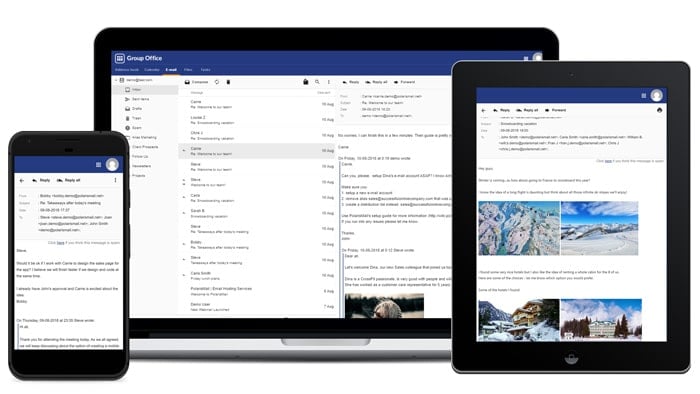 Fully featured, responsive webmail for Basic and Enhaced mailboxes
Basic E-mail Hosting Features
E-mail Migration
We will help you move your domains, users and e-mail data with no downtime and at no cost
Our Private Concierge migration service renders moving your users to PolarisMail a breeze. One of our engineers will walk you through all the details and set up a migration plan with you.
The move itself will be transparent to you and your users with the following guarantee:
- Exact replica of your current setup
- No downtime
- No lost e-mails
- No delayed e-mails
- Transfer of contacts, calendar items, tasks & notes
- Free of charge
Large mailboxes: 25GB
Dynamically allocated storage:
Each customer receives a total storage pool equal to Number of Users X 25GB. This means that as the Administrator you can create mailboxes of different sizes depending on your needs. Some users may only be allocated 10GB while others can have 50GB for example.
Use Your Own Domain
MODERN, EASY TO USE Webmail
The Webmail doesn’t need additional setup and you can access your mail from any computer or device, without installing other applications.
Our primary Webmail is GroupOffice which is available for both Basic and Enhanced mailboxes. You can access the demo account here.
To access your Webmail follow the instructions in our wiki to setup your webmail DNS records. After that you’ll be able to access your mailbox using a link such as webmail.mydomain.com .
Group Office Webmail has a modern AJAX interface, full GroupWare capabilities – Shared Calendars, Addressbook, Tasks, CalDAV and more.
We will continue supporting the existing versions of Afterlogic, Horde and Atmail but won’t provide updates for them, except for security fixes.
Out of Office & Autoresponder
Backup & Archiving
Your data is safe with us. Our multi-layered backup system ensures the safety of your data at all times.
We took good care of your data so that you don’t have to! We make copies of your data every second through RAID technology. Furthermore, we take snapshots every night and keep them on a rotating loop for up to 14 days. Each week we make a backup that is stored off-site in a secure location. We keep up to 1 month of backup data.
We can also provide you with an e-mail archive for your company in order to meet the most stringent compliance laws such as Sarbanes-Oxley. Contact one of our representatives to discuss your options.
Archiving
Each user has a special ARCHIVE folder in their IMAP account that holds a live, read-only archive of the previous 30 days. Every message in every folder is kept in case you accidentally erase something important.
Domain Alias
Do you need to consolidate all your domains into one and only have one mailbox to verify instead of 5 ? Domain Aliasing lets you do just that. Every e-mail account, alias or list that you create within your main domain will automatically be valid for all the define Alias Domains.
Whenever someone e-mails [email protected] , the e-mail will be delivered to [email protected] and Joe only has to check one mailbox.
Shared Folders
With Shared Folders you can easily grant specific access to your e-mail folders to your co-workers. You can decide which user can view which folder and if they can only view it or also modify it.
The folders shared by others with you will be available under a special folder called ‘shared’ in your IMAP folders list.
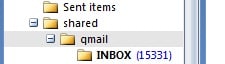
Since the Shared Folders is an IMAP level feature, this functionality is available in both your e-mail client and Webmail, wherever you are.
Access to API
Ad Free
No ads and no mining of your e-mail data.
Our webmails are completely ad-free and your e-mail data is private – we don’t scan for keywords for marketing purposes (or data mining).
Private Label
With PolarisMail you can easily brand all the interfaces with your name and logo. Your users or clients will see a familiar name that they already trust.
We also offer a private domain name that is not visibly linked to our company and which can be used for the various e-mail configurations.
Control Panel
Customize forwards, aliases, out of office replies, delivery rules, restore e-mails that you accidentally deleted and many more functions available.
You can access our Control Panel directly from your webmail or by accessing cp.emailarray.com
Personal Support
Message Delivery Rules
Redirect incoming messages to specific folders or other e-mail accounts based on user-defined rules.
With Incoming Filtering Rules you can redirect incoming e-mail messages based on certain criteria: From, To, CC, Subject, Size, List-Id. Messages can be redirected to specific folders within each mailbox or can be sent to other e-mail accounts.
Whitelist & Blacklist
Or you can blacklist it to be sure their e-mail will be blocked and will go straight to your Spam folder.
Forwards & User Extensions
User Extensions allows you to uniquely extend your e-mail address in order to create disposable addresses. Extensions take the form [email protected] and can either be defined by the user or left as wild cards.
They can also be very useful when dealing with shared mailboxes but when you still need to address someone in particular. A support team will have the address [email protected] but an individual user from the team can give out [email protected] as his address.
Free File Storage
Each user receives 5GB of storage space as his personal drive in the cloud.
Data on the webdrive can be shared with other users and it also allows for document editing & version control.
In AfterLogic the ownCloud file storage is seamlessly integrated within the webmail. You can send files saved in ownCloud directly from the webmail interface, by attaching files or by sharing and inserting link into e-mail.
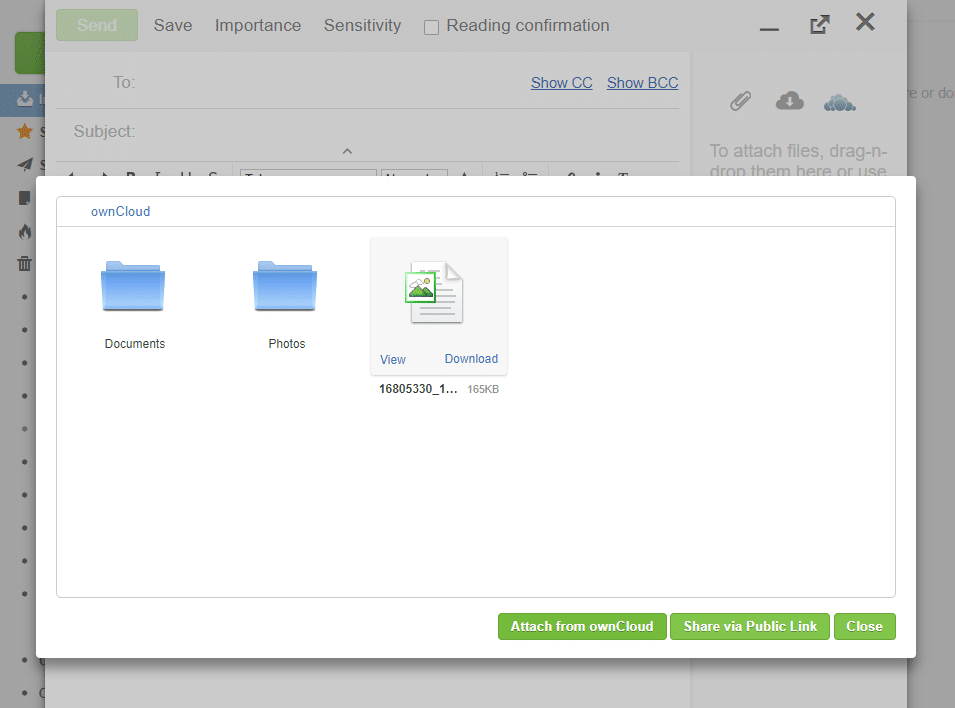
You can also save received attachments directly to ownCloud, or manage your ownCloud files from a separate tab in Afterlogic webmail.
Large Attachments: 50MB
We support the sending and receiving of e-mails up to 50MB in size. This large limit will let you easily share your most important work documents.
If you require an even higher limit or easier distribution of documents to your workgroup, take a look at our Enhanced E-mail Service.
Advanced Spam & Virus Filtering
Local messages
Messages sent among users of the same domain are never filtered for Spam, but will be checked for Viruses. This helps prevent Virus outbreaks within organizations while eliminating internal false positives.
Automatic whitelisting
Our system detects the people that you communicate most often with and will automatically whitelist your recipient on the way back, bypassing all Spam filters. The Virus filtering is still active however.
Outbound messages
Our service never filters outbound e-mail messages sent to remote recipients. There is therefore no worry that messages might be discarded from our end.
Inbound messages
Incoming e-mail messages are filtered through several layers before arriving in your Inbox or Spam folder:
- RBL check of the sender IP
- Intent verification
- Whitelist/Blacklist verification
- Content verification against known Viruses
- Content verification against known Spam keywords
- Content verification against known Spam links
- Bayesian analysis of the message
- Preference checking ( Sensitivity, Delivery location )
In order to declutter your Spam folder, PolarisMail has implemented the Spam and HardSpam folders. Messages for which we are more than 70% sure they are Spam will be sent over to the HardSpam folder. Messages for which we are 50%-70% confident they are Spam, will be going to the Spam folder. This makes reviewing your Spam folder a breeze since you have much less messages to look at.
The filtering system can be configured individually or domain-wide by an administrator. Individual preferences will always override domain-wide settings. Here are some of the settings you can adjust:
- Filter sensitivity
- Spam delivery ( Inbox, Spam, Delete )
- HardSpam definition
- Number of Days to keep Spam messages
- Whitelists & Blacklists
- Spam Review Monitor
Retraining Messages
Messages that were incorrectly classified can easily be retrained through two methods:
- Moving the message from the Inbox to the Spam folder or vice-versa
- Creating a spam/[email protected] address where you can forward the message to be retrained
SSL/TLS Encryption
IMAP TLS is available on port 143
IMAP SSL is available on port 993
POP3 TLS is available on port 110
POP3 SSL is available on port 995
SMTP TLS is available on ports 25, 26, 587
SMTP SSL is available on port 465
Two Factor Authentication
Without 2FA, you enter in your username and password, and then you’re done. The password is your single factor of authentication. With PolarisMail, you can access true two-factor authentication across Webmail, SMTP, POP and IMAP.
How It Works?
You login to your service by entering your e-mail address and password, with the 6 digit code provided by an app installed on your smartphone (Google Authenticator), appended to it.
For example, when accessing WebMail or using your email client, if your regular password is: johndoe and the current code is 123456, enter: johndoe123456 in the password field, in order to authenticate.
Catchall, Lists & Aliases
Redirect non-existing e-mails, keep in touch with your list members and create alias e-mail accounts.
A Catchall lets you capture all e-mails destined for non-existing users and redirect them to the mailbox of your choice.
Lists allow you to create distribution groups of users within your organization. You can also fine-tune the list settings, such as defining who can post to the list or the distribution method.
E-mails sent to the list can be distributed to everyone simultaneously or in a round-robin fashion. This is highly useful for sales departments that want to equally distribute incoming leads for example.
Aliases enable you to create valid e-mail addresses that forward to a real mailbox on the server or remotely.
Speed & Reliability
Our entire infrastructure is designed to ensure optimal performance of your e-mail. Visit the About Us page for more information. As our customer, we can guarantee the following:
- 100% uptime
- No lost e-mails
- Lightning fast delivery of e-mails
- Instantaneous access to e-mails
- Ironclad data privacy
Furthermore, our system tracks every e-mail sent & received which allows you to quickly determine its path and delivery time.
SMTP, POP3, IMAP
We implement the most feature rich version of each major communication protocol on a widely accessible number of ports. Each service is load-balanced and redundant to ensure 100% uptime.
SMTP
Our SMTP daemon is fully compatible with RFC 5321 and is available on ports 25, 26, 465 and 587. Messages as big as 50MB are allowed to be sent or received through it.
POP3 & IMAP
We implement the latest stable version of Dovecot as our POP3 & IMAP daemon. It’s the most advanced IMAP daemon with full support for the IDLE command.
POP3 is available on ports 110 & 995
IMAP is available on ports 143 & 993
IMAP capabilities are: IMAP4rev1 LITERAL+ SASL-IR LOGIN-REFERRALS ID ENABLE SORT SORT=DISPLAY THREAD=REFERENCES THREAD=REFS MULTIAPPEND UNSELECT IDLE CHILDREN NAMESPACE UIDPLUS LIST-EXTENDED I18NLEVEL=1 CONDSTORE QRESYNC ESEARCH ESORT SEARCHRES WITHIN CONTEXT=SEARCH LIST-STATUS ACL QUOTA
Enhanced E-mail Hosting Features
Our Basic E-mail hosting package is ideal for companies requiring core e-mail functionality. Simple and affordable, each account still comes with enterprise-level features.
But the Enhanced E-mail hosting solution is the ultimate collaboration package for your company. It allows seamless integration between your desktop and mobile device while extending your online office capabilities. It comes bundled with all the basic features described above, plus:
E-mail, Calendar and Contact Synchronization
Active Sync®
Activesync® is a protocol designed by Microsoft in use by many mobile devices and which allows seamless synchronization of your e-mails, calendar and address book.
Outlook®
Using Activesync® or an Outlook plugin you will keep your contacts, calendar, tasks & notes in sync with our server and your mobile device. E-mail will be accessed using IMAP.
Thunderbird, Apple Mail, iPhone, iPad
Any application that supports the open protocols of CalDAV and CardDAV can connect to our service and synchronize their calendar and addressbook. E-mail will be accessed using IMAP.
Easy to use Webmail
You can access the demo account here.
IMAP Account Consolidation
You can add all your other IMAP accounts to our Webmail interface and manage them all from one easy to use location.
Bring all your IMAP accounts under one roof. Our Webmail interface supports multiple IMAP accounts and multiple identities for sending e-mail out. You no longer have to log to different websites in order to check your business or personal accounts.
Each account can use separate SMTP servers, supports unique signatures and address books!
Account Summary
View all the important information in one easy to access place.
Summary Page
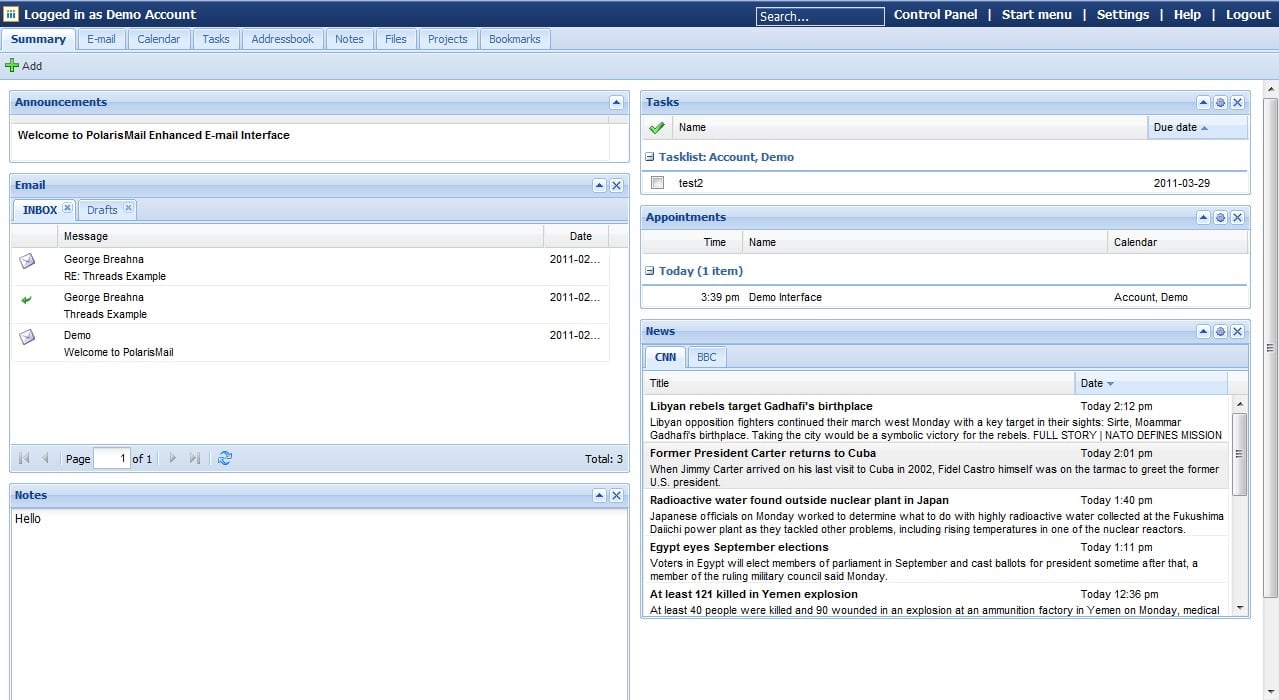
The Summary page in Polaris Mail is your launch pad for all your most important daily tasks. And that’s why it’s the first page to greet you when you log into your account.
On the summary page, you get direct access to your inbox and can start reading and answering your email right away. You can also quickly and easily view and make changes to your appointments, tasks and notes etc. through any other portlets you mount on the page. ‘Portlets’ are small movable boxes you can place on your summary page, each of which acts as a ‘portal’ to the most frequently used utilities.
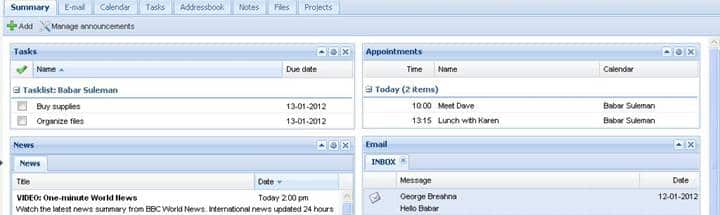
The Portlets
Using the ‘Add’ button at the top of the page, you can control which portlets you want to have displayed on your summary page. All the portlets come with an arrow button that you can use to expand or collapse them. You can also drag and drop them anywhere you want on the page. There are 6 different portlets you can choose from:
E-mail
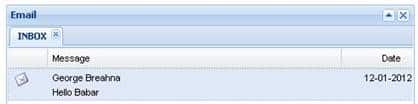
The email portlet is displayed by default. It shows the most recent email from your inbox (and any other email folders of your choice) but you can use the navigation buttons at the bottom to access older messages. The best thing about the email portlet is that you can read and answer your email right from the summary page. Each message is displayed using its ‘subject’ and name of sender. When you double click on any one of them, the whole email opens in a dialog box. Once you are done reading, you can click on ‘Reply’, and compose and send your message straight away. You have access to all common email commands like ‘address book’, ‘attachments’ and ‘print’ from within the dialog box so you don’t have to leave the Summary page to stay on top of your email.
News
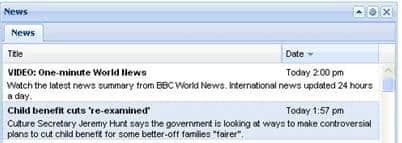
The News portlet lets you add your favorite RSS feeds to it so you can start your day by reading the latest news from your favorite channels and media sources. You can use the ‘Configure’ button at the top of the portlet to add your own RSS feeds. The labels you give to the feeds shows up as tabs in the portlet and you can use the tabs to switch between updates from all your added feeds.
Notes

The Notes portlet lets you quickly type in or copy-paste anything you need to make a note of. For instance, suppose you come across a quote somewhere on the Internet that you really like and want to save for later use. You can just copy the quote and drop into the Notes portlet where it will stay comfortably with the rest of your notes.
Appointments
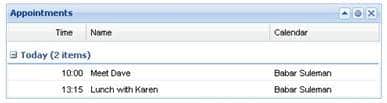
The Appointments portlet shows any upcoming appointments you might have that you previously added to your calendar. This portlet is really useful because even if you don’t check the calendar page, you would still be reminded of your appointments for the day if you have the portlet mounted on your summary page.
Tasks
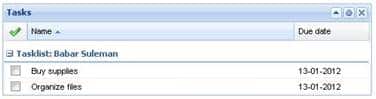
Like the ‘Appointments’ portlet, the ‘Tasks’ portlet shows your pending tasks that you previously added to the Tasks page. The ‘Tasks’ portlet acts like a handy little to-do list helping you stay organized and reminding you of all you need to get done- and by when. Once you complete any of the listed tasks, you can simply check mark it in the portlet and it will disappear from your task list.
Projects
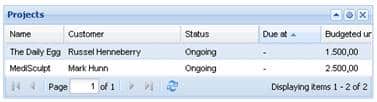
The ‘Projects’ portlet lists the name, customer, manager, deadline, budgeted units and any other columns you choose for all your projects (which you can manage on the projects page). Using the configure button, you can choose if you want to see only ongoing projects in the portlet or complete ones as well. When you double click on any project, a dialog box pops up that lets you view its details and make any changes.
In addition to the six portlets discussed above, there’s one other kind of portlet that displays information exclusive to the Summary page. It’s the Announcements portlet and you can add it from the ‘Manage Announcements’ button at the top of the Summary page. The Announcements portlet lets you display a message of your choice on the Summary page for as long as you want. It can be used for example by Administrators to broadcast messages to all the users.
Secure E-mail
Although we offer full SSL & TLS encrypted transport in between our servers and you, e-mails might still be transmitted in unencrypted format to remote mail servers that don’t support encryption.
If you are worried about this possibility, you can opt for having end-to-end encryption using either PGP, GPG or S/MIME directly from your webmail interface.
Calendar
Tasks
With Tasks you can increase your efficiency by having your own personal to do list.
File Storage
Document Editing
Collaboration
Share and edit documents with your peers.
Advanced Groupware
Sharing important business data with your colleagues has never been easier. Our tools make collaboration seamless throughout your organization.
Collaborating with your team has never been easier. With our Enhanced E-mail service you can share your e-mails, your calendars, tasks, notes & files. You can assign the users to separate groups and further control their level of access.
Summary
When each user logs on to his Webmail interface he can see at a glance the highlights for that day. It may include a message from the Administrator, a quick peek into his most important E-mail folders, Tasks & Appointments for the day along with his favorite RSS feeds.
Calendar
Every user can create multiple Calendars, private, public or only accessible to select users & groups. Each Calendar comes fully featured with:
- CalDAV access using Apple Mail or Thunderbird
- Internet Calendar (.ics) support for calendaring sharing
- Scheduling Assistant: see free/busy times for your team
- Send invitations
- Create recurring events
- Book Resources
- Save e-mail as Appointment on the Calendar
Address book
Create multiple address books for managing your contacts. Each one features:
- Import/Export function ( CSV or VCARD )
- Distribution List/Newsletter creation
- Document Template manager for Newsletters
- Available through CardDAV
Tasks
- Import/Export ( .ics format )
- Tasks Categories
- Recurring Tasks
- Reminders
- Task assignment to other users
- Create Task from e-mail
Notes
- Multiple Notebooks
- Notebook Sharing
- Create Note from e-mail
Free Website Hosting
For 5 or more of any type of e-mail accounts, you will have access to free website hosting for your business:
- 1GB of disk space for your website
- Modern, easy to use Control Panel: cPanel
- Easy WordPress installation
- MySQL, PHP
- Statistics
Limitations
Message Limit
After 300 e-mails have been sent from your account, you will receive the following error message when attempting to send further messages: “462 Daily send limit reached. Please try again tomorrow”.
If you need to send more than 300 messages per day as part of your regular operation, please contact us at : [email protected]
Mailbox size Limit
You can purchase extra quota anytime. The Basic mailbox can have a maximum of 50GB. The Enhanced and OEX mailboxes can have up to a maximum of 200GB quota.
Automatic archiving
Once a folder reaches more than 10.000 email items, emails older than six months are automatically placed in the Archive folder.
Trash Folder cleanup
Email items that are older than 30 days are purged automatically from your Trash folder.
Account Lock
In case your computer gets a virus which will send spam e-mails from your account, we will lock your account until you will clean your device and secure your email account. You will still be able to receive messages, only sending will be blocked.